> ## Documentation Index
> Fetch the complete documentation index at: https://docs.zerodrift.com/llms.txt
> Use this file to discover all available pages before exploring further.
# Quickstart
> Start validating documents with the ZeroDrift API in minutes
## Get started in three steps
Validate your first document using the ZeroDrift Validation API.
### Step 1: Get your API key
API keys live in ZeroDrift Command. Sign in, open **Settings**, then under **API** select **Keys**.
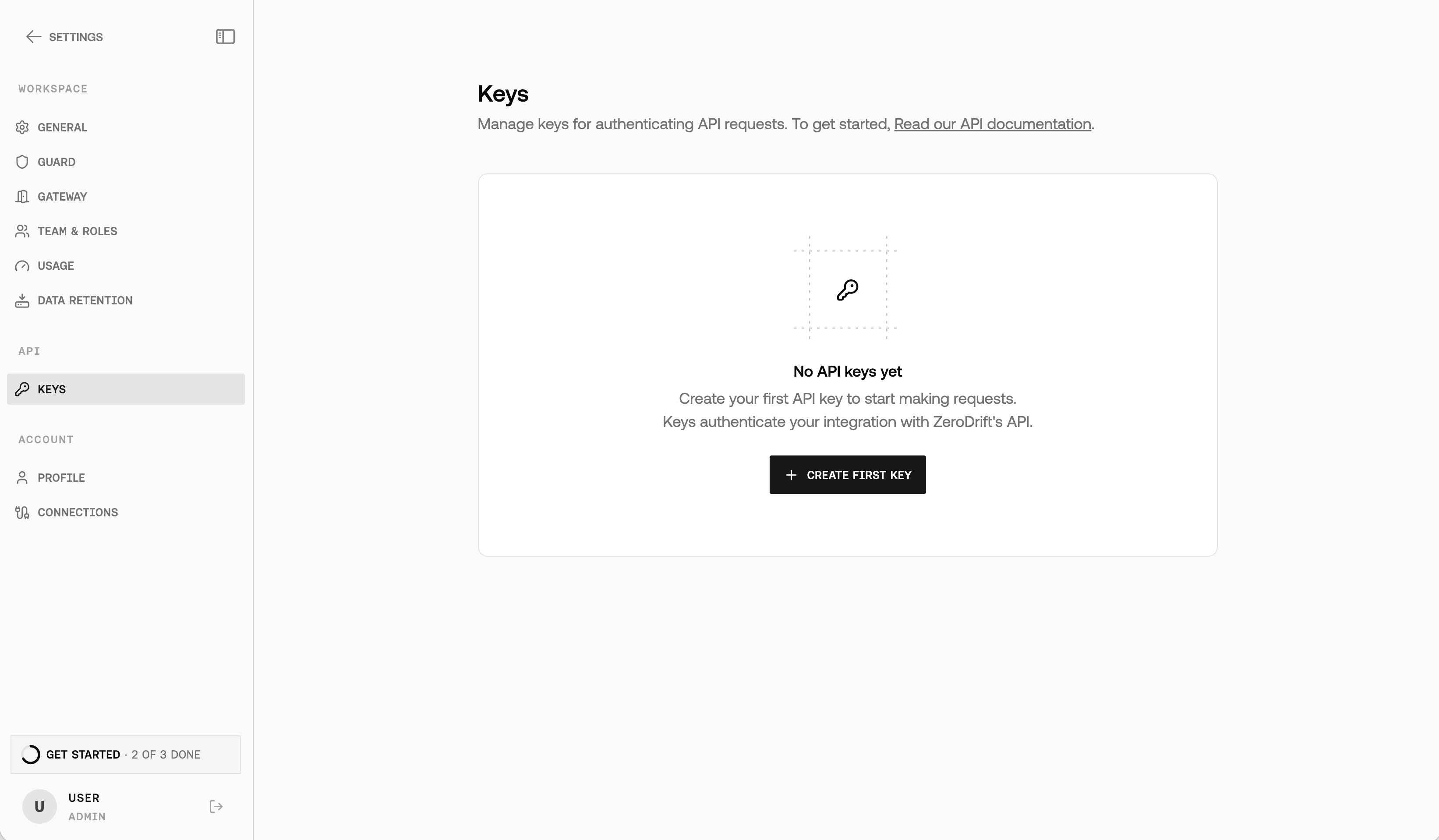 1. Select **Create first key** (or **New API key** if you already have keys).
2. In the **Create API key** dialog, enter a **Key name**, choose **Permissions** (Full access or Read only), and set **Rulepacks**.
3. Select **Create**, then **Copy** the key immediately — Command shows the full value only once.
Use the key in the `x-api-key` header for all API requests:
```bash theme={null}
x-api-key: YOUR_API_KEY
```
### Step 2: Submit content for validation
The quickest way to test the API is with a text snippet:
```bash theme={null}
curl -X POST "https://api.zerodrift.ai/api/v3/content/validate" \
-H "x-api-key: YOUR_API_KEY" \
-H "Content-Type: application/json" \
-d '{
"content": "Our fund guarantees 20% returns with zero risk!",
"document_category": "scenario_retail_investor_letter"
}'
```
You'll receive a `job_id` in the response:
```json theme={null}
{
"api_version": "v3",
"job_id": "abc123def456",
"status": "queued",
"mode": "async",
"model_engine": "anchor_3_0",
"poll": { "method": "GET", "url": "/api/v3/jobs/abc123def456" }
}
```
Validation runs asynchronously by default with the Anchor 3.0 engine (`"model_engine": "anchor_3_0"`). For short content you can set `"mode": "sync"` to receive the completed result in a single response — see [Validate Content](/api-reference/validate/validate-content).
### Step 3: Get validation results
Use the `job_id` to retrieve your validation results:
```bash theme={null}
curl "https://api.zerodrift.ai/api/v3/jobs/abc123def456" \
-H "x-api-key: YOUR_API_KEY"
```
Poll until `status` is `done` or `failed`. A completed response includes:
```json theme={null}
{
"api_version": "v3",
"job_id": "abc123def456",
"status": "done",
"model_engine": "anchor_3_0",
"overall_status": "do not send",
"summary": { "do_not_send": 1, "send_with_caution": 0, "document_pages": 1 },
"violations_by_line": [
{
"line_number": 1,
"line_text": "Our fund guarantees 20% returns with zero risk!",
"rule_count": 1,
"rules_violated": [
{
"rule_name": "Prohibited Promissory Language (Keywords)",
"rule_ref": "FINRA 2210(d)(1)(B)",
"severity": "do_not_send",
"confidence": 0.92,
"action": "replace"
}
],
"best_fix": {
"severity": "do_not_send",
"rule_name": "Prohibited Promissory Language (Keywords)",
"rule_ref": "FINRA 2210(d)(1)(B)",
"action": "replace",
"suggested_text": "Our fund has historically delivered returns, though past performance does not guarantee future results.",
"confidence": 0.92
}
}
]
}
```
## Next steps
Explore the full API capabilities:
Full request/response details for the validation endpoint used above.
Full API reference with authentication, workflows, and rate limits.
Browse the managed and custom rule pack catalog.
Machine-readable spec for client generation and LLM tools.
**Need help?** Contact us at **[support@zerodrift.ai](mailto:support@zerodrift.ai)**
1. Select **Create first key** (or **New API key** if you already have keys).
2. In the **Create API key** dialog, enter a **Key name**, choose **Permissions** (Full access or Read only), and set **Rulepacks**.
3. Select **Create**, then **Copy** the key immediately — Command shows the full value only once.
Use the key in the `x-api-key` header for all API requests:
```bash theme={null}
x-api-key: YOUR_API_KEY
```
### Step 2: Submit content for validation
The quickest way to test the API is with a text snippet:
```bash theme={null}
curl -X POST "https://api.zerodrift.ai/api/v3/content/validate" \
-H "x-api-key: YOUR_API_KEY" \
-H "Content-Type: application/json" \
-d '{
"content": "Our fund guarantees 20% returns with zero risk!",
"document_category": "scenario_retail_investor_letter"
}'
```
You'll receive a `job_id` in the response:
```json theme={null}
{
"api_version": "v3",
"job_id": "abc123def456",
"status": "queued",
"mode": "async",
"model_engine": "anchor_3_0",
"poll": { "method": "GET", "url": "/api/v3/jobs/abc123def456" }
}
```
Validation runs asynchronously by default with the Anchor 3.0 engine (`"model_engine": "anchor_3_0"`). For short content you can set `"mode": "sync"` to receive the completed result in a single response — see [Validate Content](/api-reference/validate/validate-content).
### Step 3: Get validation results
Use the `job_id` to retrieve your validation results:
```bash theme={null}
curl "https://api.zerodrift.ai/api/v3/jobs/abc123def456" \
-H "x-api-key: YOUR_API_KEY"
```
Poll until `status` is `done` or `failed`. A completed response includes:
```json theme={null}
{
"api_version": "v3",
"job_id": "abc123def456",
"status": "done",
"model_engine": "anchor_3_0",
"overall_status": "do not send",
"summary": { "do_not_send": 1, "send_with_caution": 0, "document_pages": 1 },
"violations_by_line": [
{
"line_number": 1,
"line_text": "Our fund guarantees 20% returns with zero risk!",
"rule_count": 1,
"rules_violated": [
{
"rule_name": "Prohibited Promissory Language (Keywords)",
"rule_ref": "FINRA 2210(d)(1)(B)",
"severity": "do_not_send",
"confidence": 0.92,
"action": "replace"
}
],
"best_fix": {
"severity": "do_not_send",
"rule_name": "Prohibited Promissory Language (Keywords)",
"rule_ref": "FINRA 2210(d)(1)(B)",
"action": "replace",
"suggested_text": "Our fund has historically delivered returns, though past performance does not guarantee future results.",
"confidence": 0.92
}
}
]
}
```
## Next steps
Explore the full API capabilities:
Full request/response details for the validation endpoint used above.
Full API reference with authentication, workflows, and rate limits.
Browse the managed and custom rule pack catalog.
Machine-readable spec for client generation and LLM tools.
**Need help?** Contact us at **[support@zerodrift.ai](mailto:support@zerodrift.ai)**